
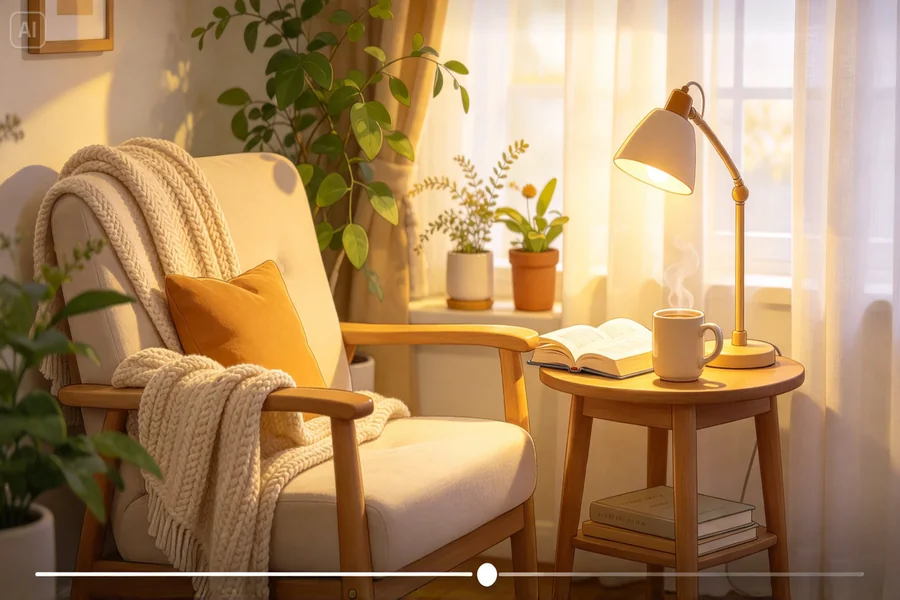
A photo of a perfectly styled reading nook, soft blanket draped just so, steaming tea beside an open book, already captures a calming mood, but watching that steam actually rise and that page actually turn pulls a viewer into the scene far more completely. AI video generator makes that quiet transformation genuinely easy, turning a cozy still photo into a slow, atmospheric reel worth sitting with.
Dreamina, powered by its advanced Seedance 2.5 video generation model, handles this kind of gentle, mood-driven motion with real sensitivity. Here’s how to bring your reading nook into soft, believable life.
Why slow, subtle motion suits this content so well
The entire appeal of slow-living content lies in its unhurried calm, which means the motion added here should whisper rather than announce itself. Steam drifting gently, a page turning slowly, soft light shifting almost imperceptibly, these small, quiet movements reinforce the mood rather than disrupting it.
Choosing a scene with natural, gentle motion potential
The strongest candidates for this technique already suggest soft movement waiting to happen:
-
A steaming beverage with visible rising steam
-
An open book with pages that could turn naturally
-
Soft fabric, a blanket or curtain, that could sway gently
-
Natural light through a window that could shift subtly
Describing stillness as much as motion
Since the goal is calm rather than constant activity, describing long pauses and settled moments alongside the subtle motion, rather than continuous action throughout, keeps the reel feeling genuinely restful rather than busy.
Choosing the right ambient sounds for a cozy atmosphere
Sound plays a subtle but important role in making a reading nook feel immersive. Gentle rain against the window, the quiet rustle of turning pages, or the soft clink of a ceramic mug can complement the visual motion without disturbing the peaceful mood. When using Dreamina’s soundtrack tools, choose audio that matches the scene’s setting and keep the overall feeling understated.
For a winter reading nook, soft rain or a crackling fireplace may fit beautifully, while birdsong and a light breeze can suit a spring afternoon. The goal is to make viewers feel as though they’ve stepped into a quiet moment of their own.
Your 3-step cozy reveal with Dreamina
Step 1: Upload reference image and write corresponding prompt
Visit Dreamina, sign in, and head to the AI Video section. Click “Add reference image” to upload your reading nook photo, then write a prompt describing the gentle, slow motion you want animated.
A strong 30-second sample prompt might read: Reference the knit blanket, steaming tea mug, and open book from the uploaded reading nook image. 0-12 seconds: soft steam rises gently from the tea mug, warm afternoon light settling across the scene. 13-22 seconds: a page of the open book turns slowly and naturally. 23-30 seconds: the scene settles into quiet stillness, steam continuing its gentle rise.
Describing slow, deliberate motion with real pauses is what keeps this content feeling genuinely calming rather than rushed.
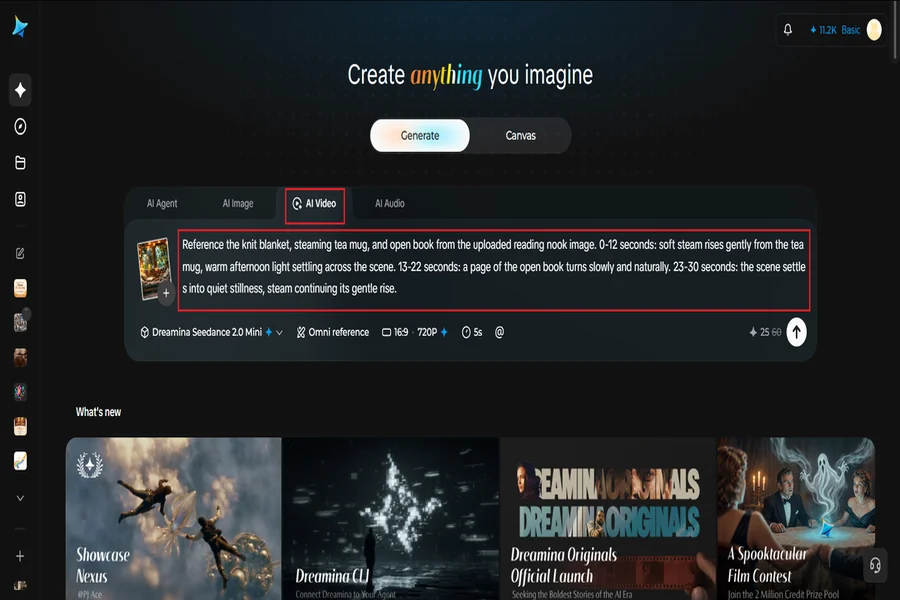
Step 2: Generate your video
After adding your image and prompt, choose the Seedance 2.5 model for generation. Next, choose your video length, then a suitable aspect ratio, 16:9 suits a YouTube ambient or slow-living channel, while 9:16 works well for Instagram Reels and TikTok cozy content. Finally, click Dreamina’s icon and wait a few seconds for processing.
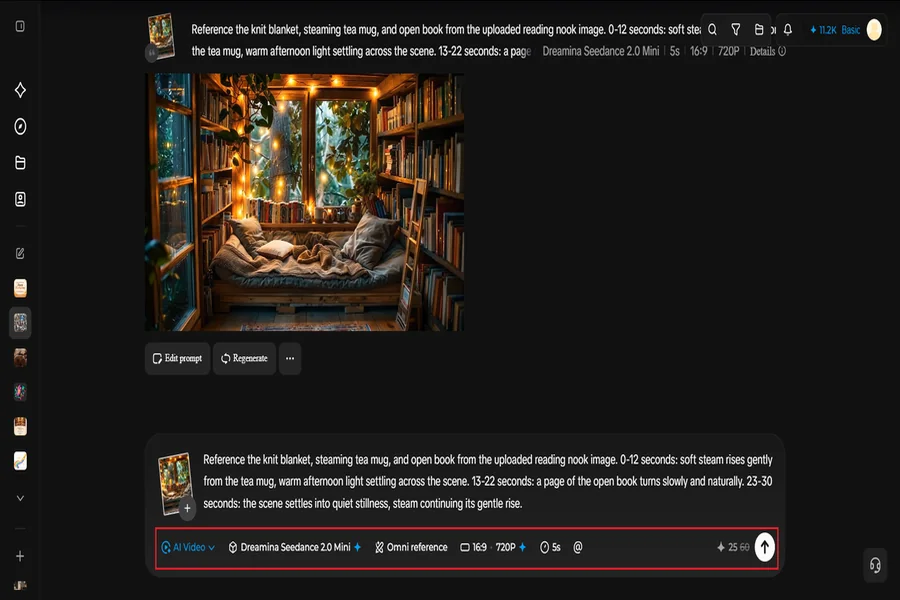
Step 3: Enhance & export the video
Polish your clip before saving it using Dreamina’s AI editing tools. Use advanced tools like Upscale for crisp, warm detail, or Generate soundtrack to add soft ambient sound, rain, a crackling fire, gentle instrumental music. Finally, export and share it across your slow-living content channels.
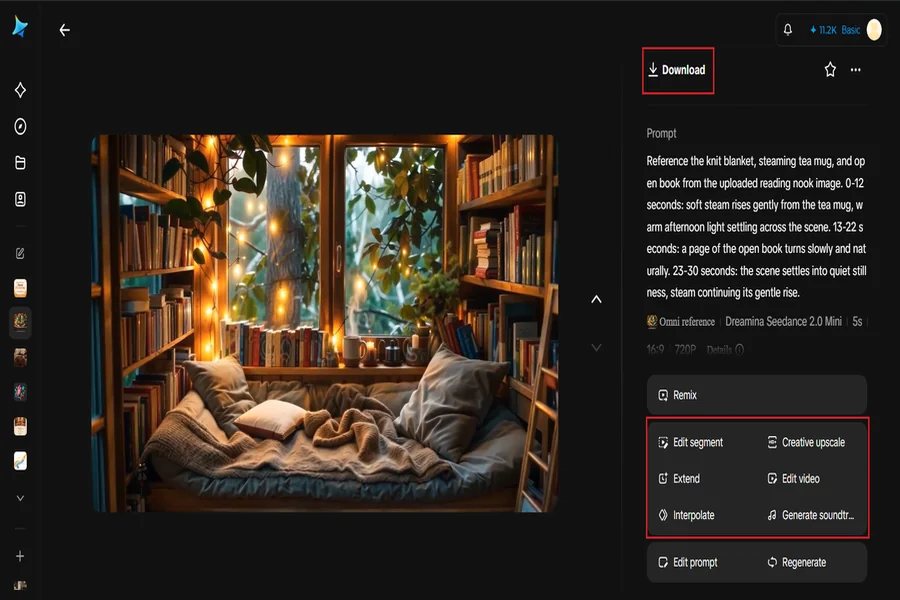
Looping the scene for extended, calming viewing
Since this kind of content often works best as longer background viewing, structuring your described motion to feel cyclical rather than building toward a specific ending makes the clip genuinely pleasant to loop for extended relaxation or focus sessions.
How Seedance 2.5 supports this gentle atmospheric style
Seedance 2.5’s reduced “AI look” and more realistic texture rendering prove especially valuable for this kind of quiet content, helping steam, fabric, and natural light feel genuinely organic rather than artificially uniform.
Its improved video extension quality also matters for longer ambient pieces, keeping the scene’s calm consistency intact even across an extended runtime.
Building a seasonal collection of cozy scenes
Once one reading nook animates successfully, creating a small series across different seasons- a sunlit spring corner, a snow-lit winter window- builds a genuinely cohesive collection of calming content worth returning to throughout the year.

Where cozy, slow-living reels find real engagement
This kind of gentle atmospheric content has real appeal across several platforms:
-
Ambient and relaxation content channels
-
Book and reading community social accounts
-
Home decor and lifestyle brand content
-
Study and focus background content
Styling the corner with real, tactile detail first
The stronger your original photo- genuine texture in the blanket, a book that looks actually read, natural light rather than harsh lamps- the more convincing the final animated motion will feel, since the generation has real detail to work from rather than a flat, generic setup.
Final thoughts
A cozy reading corner’s quiet charm comes through even more fully once it’s gently in motion, and image-to-video makes that kind of soft, believable animation genuinely easy from a single well-styled photo.
With Dreamina and its advanced Seedance 2.5 video generation model, steam can rise and pages can turn with real, unhurried calm.
Choose a scene with natural, gentle motion already waiting, keep the pacing slow, and let Dreamina help your cozy corner breathe.